
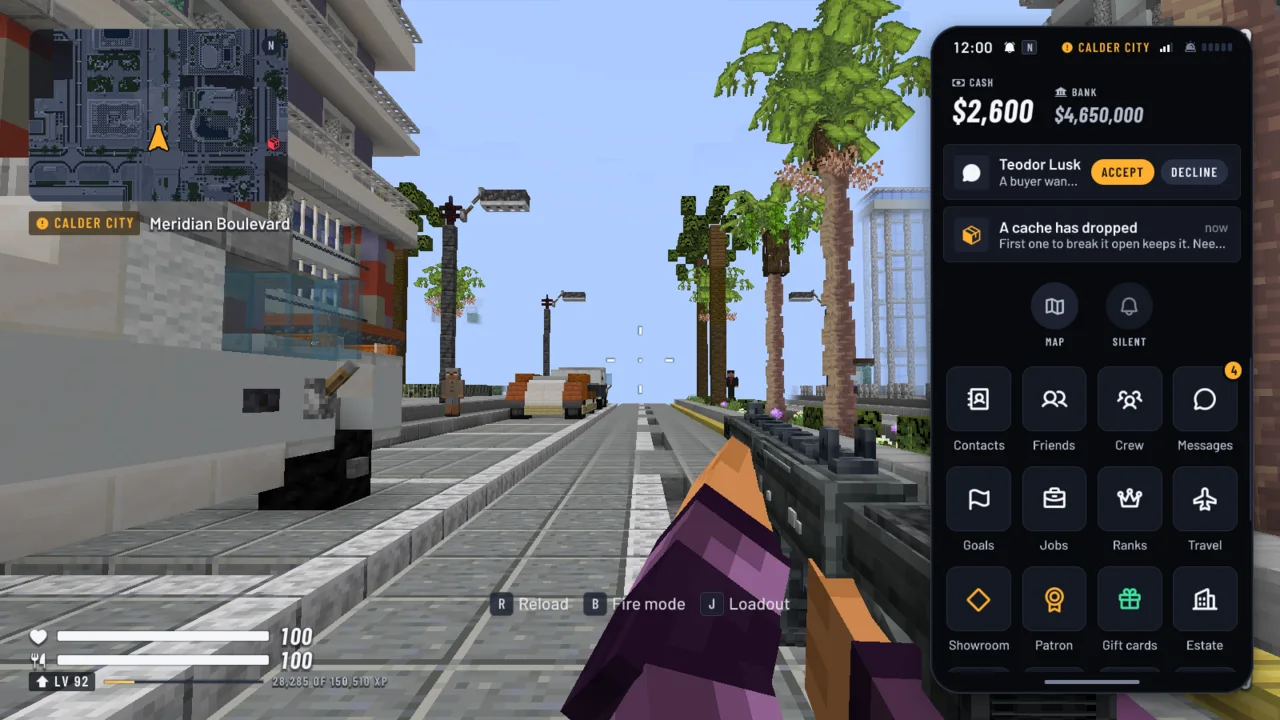
Using the phone
- Press Z to raise it, or type
/cityphone. - Arrow keys, Tab and Enter move around. N opens the notification shade.
- Esc, Backspace or Z puts it away. Taking damage or dying lowers it too.
- Incoming calls raise it for you, unless you are in combat.
At the top you see your cash and bank balance and your latest texts. Two quick actions sit above the apps: Map opens the full city map and Silent mutes notification sounds and the ringer.
Apps for work
Messages
Texts from your contacts, including job offers. Press Y to accept or N to decline.
Contacts
The people who give you work. Call one to hear their current offer.
Jobs
The board of jobs available at your level, with the pay and cooldown for each. Heist shares are set here too.
Goals
Your next starter goals. This is the app that guides your first few hours.
Ranks
Your current rank, pay and XP bonuses, your daily stash and the Rank up button.
Apps for money and property
Bank
Your balances and recent movements, plus a waypoint to the nearest bank. Money only moves at a teller or an ATM, not from the app.
Estate
The places you own. Set a waypoint, manage a property or travel home.
Travel
Go back to the arrival point, or travel home to a property you own. It takes five seconds of standing still.
Delivery
Order shop items to where you are standing, or to the locker at your property.
Wardrobe
Your clothing and outfits.
Arsenal
The weapons on your belt and in storage.
Apps for trouble
Lawyer
Pay from your bank balance to clear up to four wanted stars, as long as the police cannot currently see you.
Bounties
See who has a price on their head, place a bounty or pick up a hitman contract.
More in the wanted level guide.
Apps for people
Friends
Your friends list and requests.
Crew
Your crew's home screen: roster, bank, ledger, holdings, chat and level.
Emotes
Your emote collection.
Discord
Link your Minecraft account to the GTA Craft Discord with a six-character code.
Store apps
Store is the real-money basket and checkout, Showroom is where you spend Diamonds, and Gift cards and Patron show your codes and supporter level. Everything sold there is also on the web store.
Settings
The Settings app changes interface size, reduced motion, volume and notification sounds, minimap zoom, how long the death sequence runs, and emote camera and sound options.
Phone FAQ
How do I open my phone in GTA Craft?
Press Z. You can keep moving and driving while it is open.
Can I transfer money from the phone?
No. The Bank app shows balances only. Deposits and withdrawals happen at a bank teller or an ATM.
How do I accept a job from a text?
Open Messages and press Y on the offer, or N to decline it.
Can I get rid of a wanted level from my phone?
Yes, with the Lawyer app. It clears up to four stars for a fee from your bank balance, but only while the police cannot see you.